Note
Go to the end to download the full example code.
A training dataset with background images#
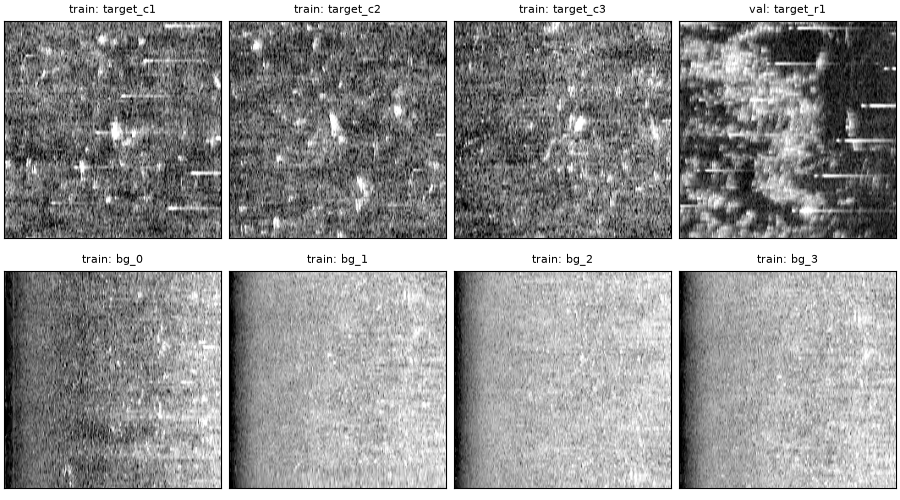
A classifier that only ever sees targets learns nothing about what is
not a target. build_target_dataset() adds
background images (windows whose footprint holds no catalog target),
splits targets and backgrounds into training and validation sets, and
writes the result in the folder layout Ultralytics YOLO reads, with COCO
files alongside.
The catalog is the illustrative one from Target chips at several corrections and resolutions.
Data: USGS Grand Bay, U.S. public domain (see Example data).
Usage: python examples/gallery/plot_training_dataset.py [output_dir]
# 2026 rshomberg@uri.edu

import sys
from pathlib import Path

import matplotlib.pyplot as plt
import yaml
from PIL import Image

from sidescanpy import datasets
from sidescanpy.core.target import Target
from sidescanpy.export.ml import DatasetSpec, build_target_dataset
from sidescanpy.io import read_and_convert
from sidescanpy.io.hdf5 import write_survey
from sidescanpy.log import configure_logging
from sidescanpy.processing import (
    apply_tvg,
    compute_geometric_ranges,
    compute_georeferencing,
    interpolate_aux_onto_pings,
)

out = Path(sys.argv[1]) if len(sys.argv) > 1 else Path(".")
out.mkdir(parents=True, exist_ok=True)
configure_logging("WARNING")

survey = read_and_convert([datasets.fetch("usgs_grand_bay_150602205800.xtf")], fmt="xtf")
survey = interpolate_aux_onto_pings(survey, merge_window_s=0.3)
survey = apply_tvg(survey)
survey = compute_geometric_ranges(survey)
survey = compute_georeferencing(survey)
ss_dir = out / "ss_h5"
ss_dir.mkdir(exist_ok=True)
write_survey(survey, ss_dir / "grand_bay_150602205800.ss.h5", overwrite=True)

catalog = [
    Target(tid, "manual", "picked by eye", latitude=lat, longitude=lon, channel=side,
           sample=sample, ping=ping, category=cat, position_confidence="verified")
    for tid, cat, lat, lon, side, sample, ping in [
        ("c1", "contact", 30.3642369, -88.3602696, 1, 2523, 85),
        ("c2", "contact", 30.3640208, -88.3602611, 1, 1736, 127),
        ("c3", "contact", 30.3638172, -88.3604494, 1, 1376, 217),
        ("r1", "reef", 30.3632802, -88.3595788, 0, 2621, 73),
        ("r2", "reef", 30.3628830, -88.3599460, 0, 3317, 208),
    ]
]
21:15:35 WARNING sidescanpy.processing.aux_fixes: held_value_fixes ['heading_deg']: 4 update events combine more than 5 changes; the stream may update faster than merge_window_s=0.3 s
21:15:35 WARNING sidescanpy.processing.aux_fixes: held_value_fixes ['heading_deg']: 4 update events combine more than 5 changes; the stream may update faster than merge_window_s=0.3 s
21:15:35 WARNING sidescanpy.processing.aux_fixes: held_value_fixes ['pitch_deg']: 4 update events combine more than 5 changes; the stream may update faster than merge_window_s=0.3 s
21:15:35 WARNING sidescanpy.processing.aux_fixes: held_value_fixes ['roll_deg']: 2 update events combine more than 5 changes; the stream may update faster than merge_window_s=0.3 s
Eight background windows whose footprint holds no catalog target
(background_margin_m keeps them further away), and a validation
share of 40 %. Targets are split by a hash of their id and backgrounds by
ping block, so overlapping windows never end up on both sides of the
split; the shares are therefore only approximate. A real dataset has many
more targets and lines; with five targets on one short line, the split is
only there to show the layout.
spec = DatasetSpec(
    styles=("chip",), render_level="geometric", size_px=256, resolution_m=0.1,
    box_size_m=4.0, categories=["contact", "reef"],
    n_background=8, val_fraction=0.4, split_block_pings=50,
    layout="ultralytics", seed=0,
)
result = build_target_dataset(ss_dir, catalog, spec, out / "dataset")
# The spec round-trips through YAML, so a project can keep it in its config.
(out / "dataset_spec.yaml").write_text(yaml.safe_dump(spec.to_dict()))
assert DatasetSpec.from_yaml(out / "dataset_spec.yaml") == spec
chip = result.styles["chip"]
print(f"{chip.n_target_images} target and {chip.n_background_images} background images, "
      f"{chip.n_annotations} boxes, split {chip.split_counts}")
for path in sorted((out / "dataset" / "chip").iterdir()):
    print(path.relative_to(out).as_posix() + ("/" if path.is_dir() else ""))
5 target and 8 background images, 5 boxes, split {'train': 11, 'val': 2}
dataset/chip/augmentations.json
dataset/chip/data.yaml
dataset/chip/images/
dataset/chip/labels/
dataset/chip/train.coco.json
dataset/chip/val.coco.json
data.yaml is what ultralytics reads (YOLO("yolo11n.pt").train(
data="dataset/chip/data.yaml")); train.coco.json and
val.coco.json describe the same images for other tools. A background
image has no label lines.
print((out / "dataset" / "chip" / "data.yaml").read_text())

images = sorted((out / "dataset" / "chip" / "images").rglob("*.png"))
targets = [p for p in images if p.name.startswith("target_")][:4]
backgrounds = [p for p in images if not p.name.startswith("target_")][:4]
fig, axes = plt.subplots(2, 4, figsize=(9, 5), constrained_layout=True)
for ax, path in zip(axes.ravel(), targets + backgrounds):
    ax.imshow(Image.open(path), cmap="gray")
    ax.set_title(f"{path.parent.name}: {path.stem}", fontsize=8)
    ax.set_xticks([])
    ax.set_yticks([])
fig.savefig(out / "training_dataset.png", dpi=150)
path: /home/runner/work/sidescanpy/sidescanpy/docs/_build/gallery-output/dataset/chip
train: images/train
val: images/val
names:
  0: contact
  1: reef
nc: 2
Look at the backgrounds before training. Here they come from the inner
swath beside nadir and, after the per-image stretch, are brighter and
smoother than the target chips: a classifier can learn that difference
instead of the objects. More lines, background_ping_ranges (where to
draw backgrounds from) and the same normalization_scope for both
kinds of image make the two sets look alike apart from the targets.
Total running time of the script: (2 minutes 58.108 seconds)